One wallet for all your crypto.
Store, send and receive 22 coins and tokens across 19 major networks — and spend any of them with your Fizardus card. In Telegram and in your browser, one account.
 USDTTRC20Cheapest, fastest USDT transfers.USDTBEP20Low-fee USDT on BNB Chain.USDTERC20The original USDT on Ethereum.USDTTONUSDT native to Telegram’s TON.USDTPolygonUSDT on Polygon, cents per transfer.USDTSolanaUSDT at Solana speed.
 USDCERC20Regulated dollar on Ethereum.USDCBEP20USDC with low BNB Chain fees.USDCSolanaUSDC at Solana speed.USDCPolygonUSDC on Polygon, cents per transfer.
 BTCNativeThe original digital gold.
 ETHNativeSmart contracts and DeFi.
 BNBNativeFuel of the BNB Chain.
 TRXNativeHome of cheap USDT.
 TONNativeThe Telegram-native chain.
 SOLNativeHigh-speed, low-cost chain.
 XRPNativeFast cross-border settlement.
 ADANativeResearch-driven proof-of-stake.
 DOTNativeA network of connected chains.
 LTCNativeLightweight digital silver.
 POLNativeEthereum scaling, made cheap.
 AVAXNativeFast finality, subnets.
 LINKERC20The oracle of Web3.
 ATOMNativeThe internet of blockchains.
 NEARNativeDeveloper-friendly and fast.
 XLMNativePayments and on/off ramps.
 ARBNativeLeading Ethereum L2.
 OPNativeOptimistic Ethereum rollup.
 APTNativeParallel-execution L1.
 SUINativeObject-centric, low-latency.
No assets match your search.
+18Wallet Protect
Balances are secured with shared-key controls — nothing moves without your confirmation. No KYC, no documents.
Spend with your card
Top up your Fizardus card straight from your wallet and pay anywhere.
Every major network
TRC20, BEP20, ERC20, TON, Solana, Polygon and more — no wrong-network panic.
How to set up your Fizardus wallet
- 1
Open Fizardus
Create a wallet in Telegram or your browser in seconds. No documents, no KYC.
- 2
Create or import
Generate a new wallet or import an existing one with your seed phrase.
- 3
Add crypto
Receive USDT, USDC or any supported coin on the network you prefer.
- 4
Top up your card and pay
Top up your Fizardus card from your wallet and pay anywhere Visa and Mastercard are accepted.
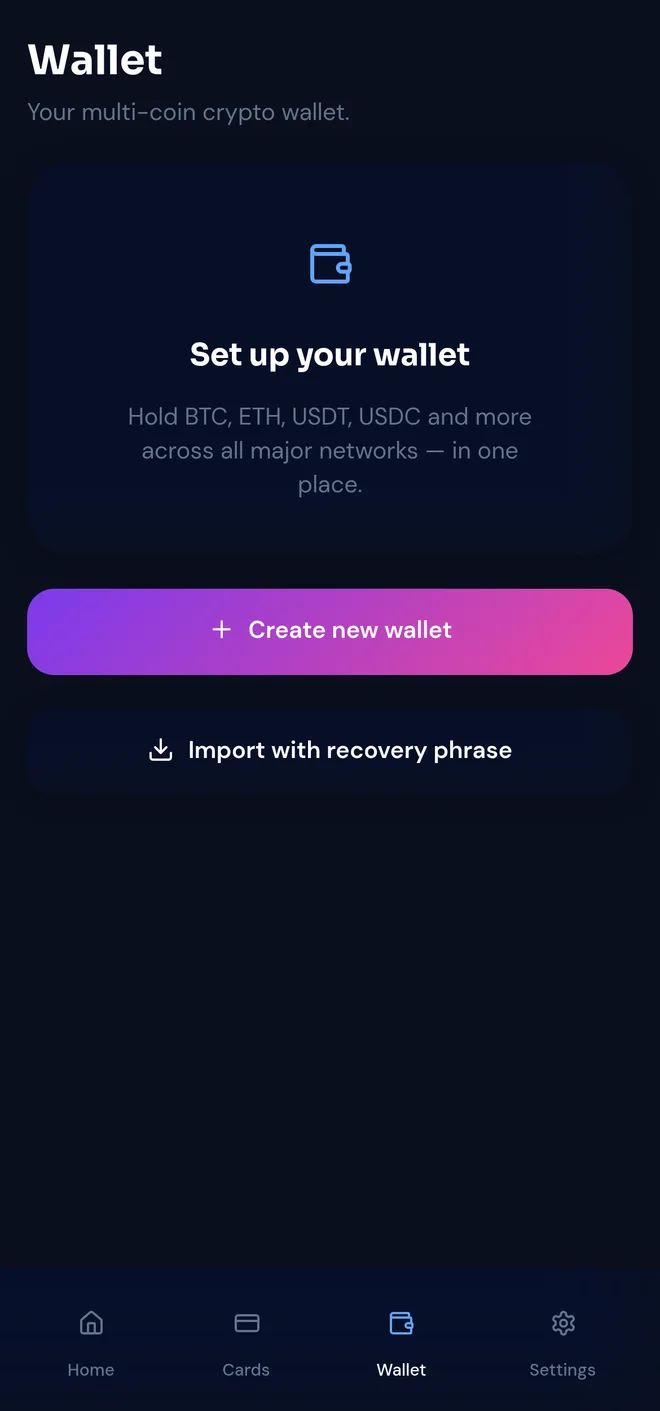
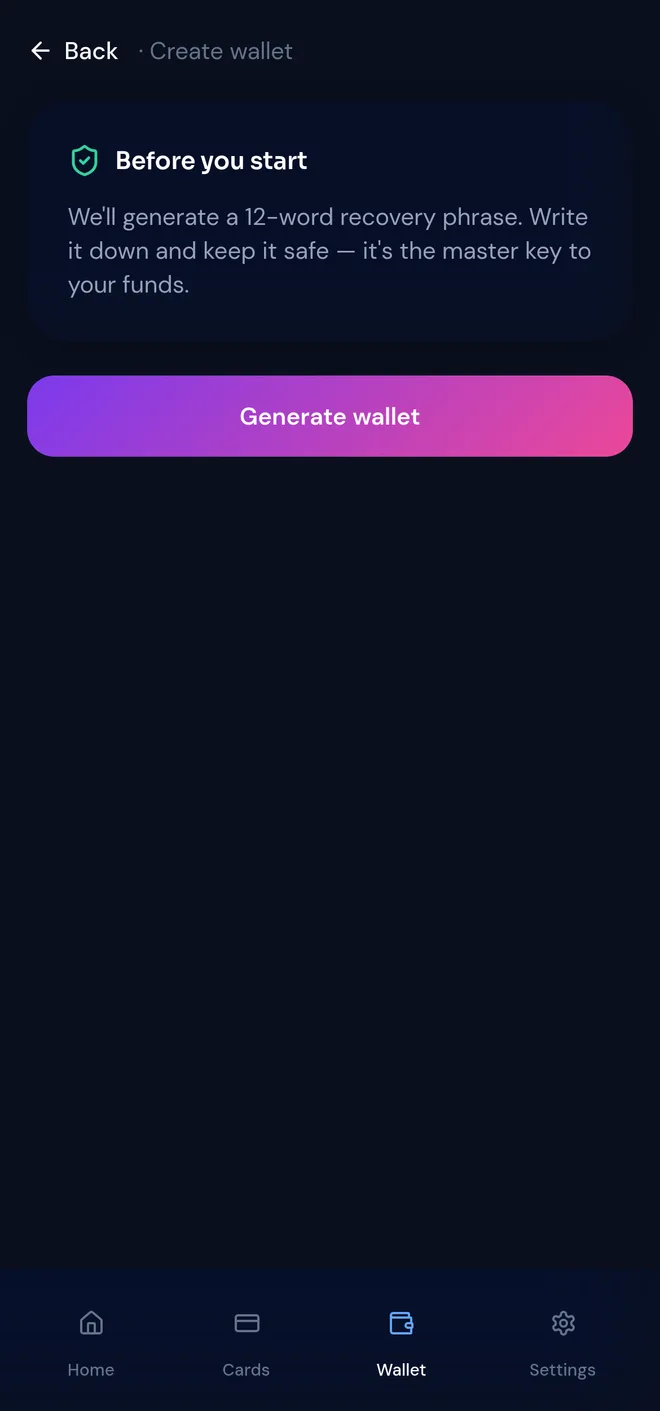
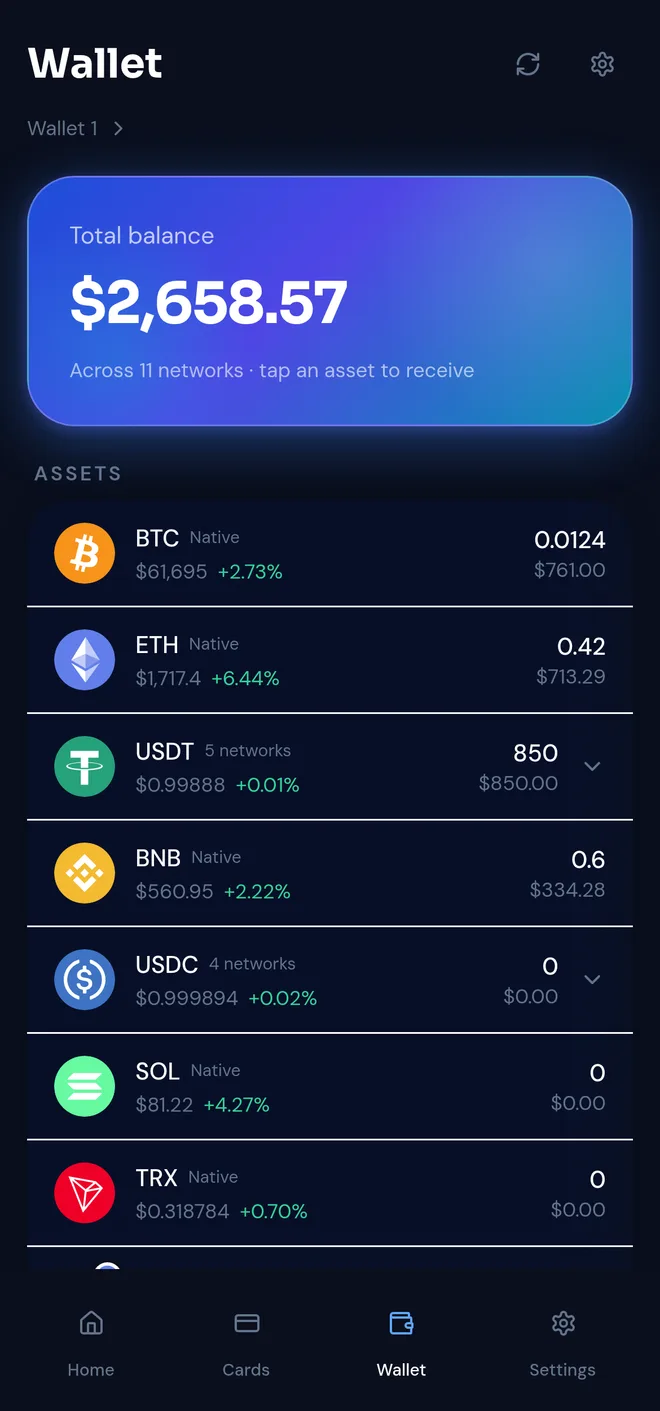
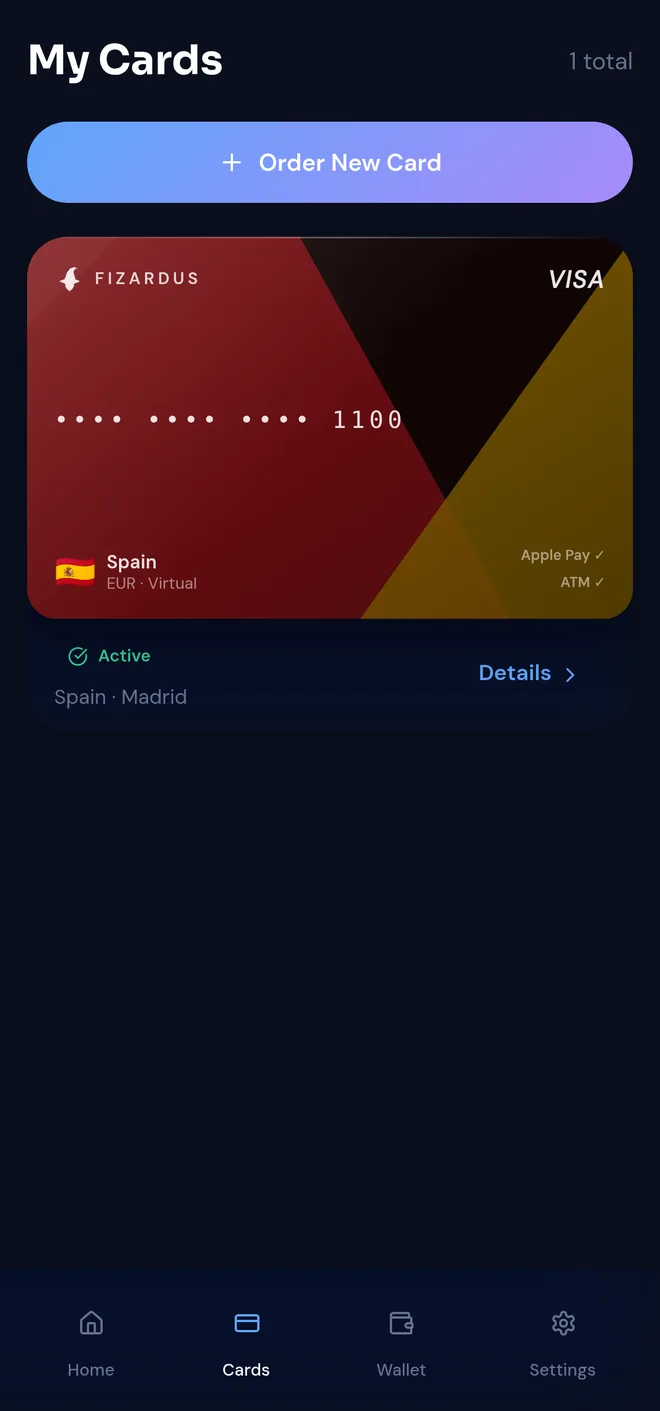
Open Fizardus
Create a wallet in Telegram or your browser in seconds. No documents, no KYC.
Create or import
Generate a new wallet or import an existing one with your seed phrase.
Add crypto
Receive USDT, USDC or any supported coin on the network you prefer.
Top up your card and pay
Top up your Fizardus card from your wallet and pay anywhere Visa and Mastercard are accepted.
Stablecoins
Dollar-pegged tokens across every major network.
USDTTRC20Cheapest, fastest USDT transfers.USDTBEP20Low-fee USDT on BNB Chain.USDTERC20The original USDT on Ethereum.USDTTONUSDT native to Telegram’s TON.USDTPolygonUSDT on Polygon, cents per transfer.USDTSolanaUSDT at Solana speed.USDCERC20Regulated dollar on Ethereum.USDCBEP20USDC with low BNB Chain fees.USDCSolanaUSDC at Solana speed.USDCPolygonUSDC on Polygon, cents per transfer.Coins & tokens
Top blockchains and assets, all in one place.
BTCNativeThe original digital gold.ETHNativeSmart contracts and DeFi.BNBNativeFuel of the BNB Chain.TRXNativeHome of cheap USDT.TONNativeThe Telegram-native chain.SOLNativeHigh-speed, low-cost chain.XRPNativeFast cross-border settlement.ADANativeResearch-driven proof-of-stake.DOTNativeA network of connected chains.LTCNativeLightweight digital silver.POLNativeEthereum scaling, made cheap.AVAXNativeFast finality, subnets.LINKERC20The oracle of Web3.ATOMNativeThe internet of blockchains.NEARNativeDeveloper-friendly and fast.XLMNativePayments and on/off ramps.ARBNativeLeading Ethereum L2.OPNativeOptimistic Ethereum rollup.APTNativeParallel-execution L1.SUINativeObject-centric, low-latency.How it works
From crypto to a card you can spend — in three steps.
Create your wallet
Open Fizardus in Telegram or your browser and set up a wallet in seconds. No documents, no KYC.
Add crypto
Send USDT, USDC or any supported coin to your wallet on the network you prefer.
Pay with your card anywhere
Top up your Fizardus card and pay online, in store and at ATMs worldwide.
Wallet fees
Flat and predictable — you always see the cost before you confirm.
Wallet deposits
No Fizardus fee — you pay only the blockchain network fee.
Wallet → card top-up
A flat 1% when you move funds from the wallet to your card.
ATM withdrawals
Depends on the card you choose — full details on the Pricing page.
Cashback on spending
Earned back on card purchases, by category.
Fizardus wallet vs an exchange account
Why keep crypto in a wallet built around a card — not on an exchange.
| Fizardus wallet | Exchange account | |
|---|---|---|
| KYC & documents | Not required | Mandatory verification |
| Spending your crypto | Built-in Visa / Mastercard with Apple Pay & Google Pay | Withdraw first, then find a card |
| Control of funds | Shared keys — nothing moves without your confirmation | The exchange holds everything |
| Withdrawal fees | Network fee only; card top-up flat 1% | Fixed withdrawal fee per coin |
Three ways to use your crypto
Top up directly, or bring your own wallet — whatever suits you.
Top up with USDT
Send USDT on BEP20, TRC20 or ERC20 and your balance lands on the card instantly. The simplest way to get started.
Create a wallet
Open a Fizardus wallet and fund it with any coin, any time — then spend straight from it with your card.
Import your wallet
Already hold crypto? Import your existing wallet with a seed phrase and spend your funds with your Fizardus card.
Every major network
No wrong-network panic — pick the chain that suits you.
Frequently asked
Is the Fizardus wallet custodial?
Fizardus uses a shared-key model: balances are co-controlled, so funds cannot be moved without your confirmation — and we are building toward a fully non-custodial model. See Wallet Protect for details.
Which coins can I store?
Stablecoins like USDT and USDC across every major network, plus leading coins such as BTC, ETH, TON, SOL and many more.
How do I spend my crypto?
Top up your Fizardus card from your wallet and pay anywhere Visa and Mastercard are accepted, including Apple Pay and Google Pay.
Do I need to pass KYC?
No. There is no KYC and no bank account required to create a wallet and get your card.
Is Fizardus a crypto debit card?
Yes. Fizardus pairs the wallet with a virtual crypto debit card — Visa or Mastercard — that you top up straight from your wallet and use online, in stores via Apple Pay and Google Pay, and at ATMs worldwide.
What is the Fizardus wallet?
The Fizardus wallet is a cross-platform crypto wallet built into the Fizardus app: it works in your browser at app.fizardus.com and inside Telegram, with one account across both. It holds 22 coins and tokens across 19 major networks — including USDT, USDC, BTC, ETH, TON and SOL — and connects directly to a virtual Visa or Mastercard debit card with Apple Pay and Google Pay support. No KYC and no bank account are required.
Depositing crypto into the wallet is free — you pay only the network fee. Moving funds to your card costs a flat 1%, ATM withdrawals cost 1–2% depending on the card, and card spending earns up to 3% cashback. Unlike an exchange account, balances are protected by shared-key Wallet Protect controls, so funds cannot be moved without your confirmation.
How Wallet Protect secures your fundsAsk AI about Fizardus
Get an instant, independent rundown of Fizardus from your favourite AI assistant — straight from our website.
Get your card, start spending crypto.
Open Fizardus in Telegram, fund your balance and pay in seconds.
Get your card